Home
How to Access Tools and Join the Maker Nexus Community in Sunnyvale
Location:
1330 Orleans Dr, Sunnyvale, CA 94089.
Facility:
28,000 sq. ft. non-profit makerspace featuring wood, metal, textiles, and 3D printing.
Cost:
Memberships range from $80 (Student) to $160 (Hobbyist) per month. A $20 "Class Only" pass is available for non-members.
Hours:
Open 7 days a week, 10:00 AM – 10:00 PM.
In the heart of Silicon Valley, Maker Nexus stands as a significant advancement for local creators, engineers, and hobbyists. This 28,000-square-foot facility is more than just a tool rental shop; it is a 501(c)(3) non-profit dedicated to the mission of "Growing Makers." Whether you are looking to prototype a new product or simply learn how to sew a quilt, the space provides the infrastructure and community support necessary to bring complex projects to life.
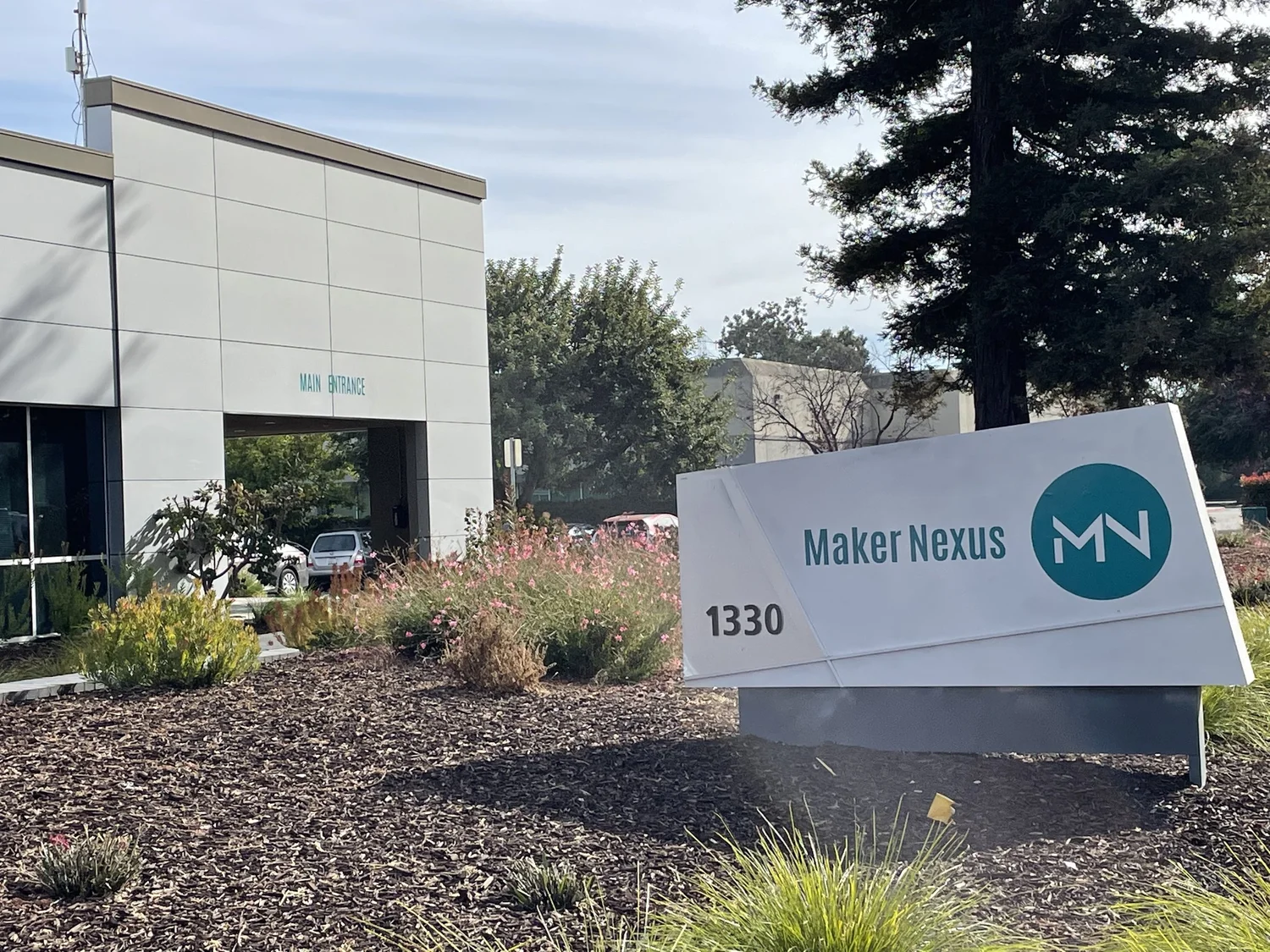
Image source: TECHNOLOGY x2
The expansive 28,000 sq. ft. floor at Maker Nexus accommodates diverse making disciplines.What to Expect When Visiting the Maker Nexus Facility for the First Time
Walking into Maker Nexus can be an overwhelming experience due to its sheer scale. The facility is divided into specialized "shops," each managed by volunteer leads who ensure the equipment remains in top-rated condition. Upon entry, you are greeted by a front desk staff member who can provide a guided tour—highly recommended for anyone unfamiliar with industrial-grade machinery.
The layout is strategically organized to separate "clean" and "dirty" activities. The front of the building houses the electronics lab, textile studio, and 3D printing hub. As you move deeper into the space, the environment shifts toward the heavy-duty woodshop and the "Hot Shop," where welding and blacksmithing occur. This zoning is critical for maintaining air quality and ensuring that sawdust from a table saw doesn't interfere with a delicate resin print.
Community is the core of the experience. Unlike a traditional gym where people work in isolation, Maker Nexus encourages collaboration. It is common to see a retired engineer helping a high school student troubleshoot a laser cutter or a professional artist sharing tips on metal patina. This culture of transparency and shared knowledge is what makes the space a top choice for makers in the South Bay.
Understanding the Membership Tiers and Monthly Access Costs
Maker Nexus offers several membership options designed to fit different budgets and usage frequencies. Because it is a non-profit, these fees go directly toward facility rent, utility costs, and tool maintenance. It is important to note that membership grants you access to the space, but specific dangerous tools require a separate safety checkout class.
| Tier | Monthly Cost | Best For | Key Benefits |
|---|---|---|---|
| Hobbyist | $160 | Individual Makers | Full access, class discounts, storage options. |
| Family | $240 | Couples/Parents | Includes two adults and minors (10-16). |
| Student | $80 | Full-time Students | Affordable entry for learners with valid ID. |
| Class Only | $20 (Annual) | Occasional Learners | Allows taking classes without monthly access. |
For those who are intimidated by the $160 monthly commitment, the Class Only pass is a notably innovative entry point. It allows you to register for any workshop or training session at the member rate (plus the class fee) without paying for a full month of shop access. This is ideal for someone who wants to complete a specific project, like a custom-engraved cutting board, and doesn't need ongoing access to the facility.
How to Navigate the Amilia Registration System for Classes and Safety Training
One of the most common points of friction for new members is the registration process. Maker Nexus uses a platform called Amilia to manage all bookings, memberships, and safety certifications. You cannot simply walk in and start using a laser cutter; you must first create an account and complete the prerequisite training.
To get started, visit the Maker Nexus Amilia Store. From here, you can purchase your membership and browse the "Equipment Training" (ET) classes. These ET classes are mandatory for tools like the ShopBot CNC, the bridgeport mill, and the wood lathes. They typically last 1.5 to 3 hours and focus heavily on safety protocols rather than artistic technique.
If you are looking for more detailed technical documentation, the Maker Nexus Wiki is an exceptionally strong resource. It contains user manuals, project ideas, and specific settings for the laser cutters and 3D printers, maintained by the community members themselves.
Essential Safety and Dress Code Requirements for Different Shop Zones
Safety is the non-negotiable priority at Maker Nexus. Because the facility houses industrial equipment that can cause serious injury if misused, the dress code is strictly enforced. Interestingly, the dress code changes depending on which "zone" you are working in.
The Natural Fiber Rule for the Hot Shop
In the welding and blacksmithing areas, synthetic fabrics like polyester, nylon, and spandex are strictly prohibited. In the event of a spark or heat flash, these materials can melt onto the skin, causing severe burns. Members are required to wear 100% cotton, wool, or leather. This is a critical safety standard that sets a high bar for participant protection.
Footwear and Jewelry Protocols
Closed-toe shoes are required throughout the entire 28,000 sq. ft. facility. However, in the metal shop, leather or heavy canvas shoes are preferred over mesh running shoes. Furthermore, the "No-Spin" rule applies to the woodshop: all rings, watches, dangling necklaces, and loose-fitting sleeves must be removed before operating any rotating machinery like a lathe or drill press. Long hair must also be tied back securely.
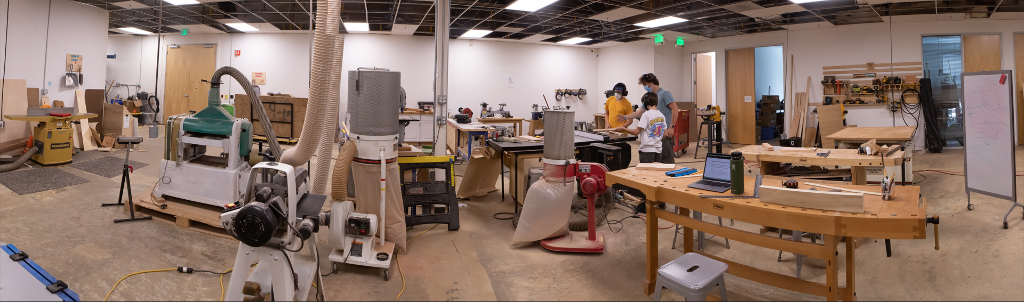
Image source: Maker Nexus
Safety signage and clear zoning help members navigate the shop without risk.Exploring the High End Tools Available in the Woodshop and Metal Shop
The equipment at Maker Nexus is widely regarded as some of the most reliable in the region. The facility invests in professional-grade brands that are often too expensive or too large for a home garage. Below is a breakdown of the top-tier equipment available to members.
- 3D Printing Lab
- Features a fleet of Prusa Mk3s printers, the large-format Prusa XL for multi-material prints, and Formlabs Form 3 resin printers for high-detail prototypes.
- The Woodshop
- Equipped with a ShopBot PRSalpha CNC , SawStop table saws (which feature automatic braking technology), and a 24-inch wide-belt sander for finishing large slabs.
- Laser Cutting
- Includes multiple Epilog CO2 lasers for wood and acrylic, as well as XTool metal lasers for permanent engraving on stainless steel and aluminum.
- The Textile Studio
- A standout feature is the long-arm quilting machine and industrial Juki sewing machines capable of handling heavy leather and canvas.
- Metal Working
- The "Cold Shop" offers a CNC Plasma cutter for precision metal shapes, while the "Hot Shop" provides TIG/MIG welding stations and a fully equipped blacksmithing forge.
How to Visit the Makerspace Without Committing to a Full Membership
If you are not ready to become a monthly member, there are several ways to engage with the community. Maker Nexus is committed to accessibility and offers "low-friction" entry points for the curious.
Monthly Craft* Night
One of the most popular social events is Craft* Night , usually organized via the Maker Nexus Meetup group . This is a casual evening where non-members can bring a small, portable project (like knitting, electronics, or sketching) to the event room. It is a free or low-cost way to "vibe check" the community and meet current members before signing up.
Drop-in Tours and Workshops
You can visit the facility for a tour almost any day between 11:00 AM and 9:00 PM. Additionally, the space offers "Make and Take" workshops. These are one-off classes where you can build a specific item—such as a leather wallet, a wooden pen, or a laser-cut lantern—and take it home the same day. These classes do not require a membership and are an excellent choice for a unique weekend activity.
Purchasing Materials and Supplies Directly on the Shop Floor
A significant logistical hurdle for many makers is the "sedan problem"—the difficulty of transporting 4x8 foot sheets of plywood or 10-foot metal pipes in a standard passenger car. Maker Nexus solves this by selling a curated selection of materials on-site.
Members can purchase high-quality Baltic Birch plywood, various hardwoods, aluminum stock, and 3D printing filament directly from the shop. This convenience allows you to show up with just your laptop and leave with a finished project. Prices are kept competitive with local hardware stores, and the proceeds help support the non-profit's operations.
The Hierarchy of Classes and Certifications for New Members
To maintain a safe environment, Maker Nexus uses a tiered class system. Understanding this hierarchy helps you plan your learning path effectively.
- Equipment Training (ET): These are the "gatekeeper" classes. You must take these to get "checked out" on a tool. They focus on how to turn the machine on, how to use it safely, and how to clean it up.
- Project Workshops: These are focused on a specific outcome. While you use the tools, these classes do not always grant you a permanent "checkout" for solo use unless specified.
- Skill Classes: These are for members who are already checked out on a tool but want to master advanced techniques, such as "Advanced TIG Welding" or "CNC V-Carving."
For families, it is important to note that for any tool requiring a safety checkout, both the parent and the minor (ages 10-16) must attend and pass the class together. This ensures that the guardian is fully aware of the risks and can provide proper supervision during independent shop hours.
Frequently Asked Questions About Joining Maker Nexus
Do I need to be an expert or an engineer to join?
Not at all. The mission of Maker Nexus is to "Grow Makers," which means they welcome absolute beginners. Most members start with zero experience in at least one area of the shop. The instructors are trained to teach people who have never touched a power tool before.
Can I store my projects at the facility?
Yes, storage is available for a small additional monthly fee. There are various sizes of storage bins and "project footprints" for larger items like furniture. However, space is limited and often has a waitlist, so it is best to inquire at the front desk early.
Is there a minimum age for members?
The minimum age to be in the shop is 10 years old. Minors between 10 and 16 must be accompanied by a parent or guardian at all times. Individuals 16 and older can apply for their own membership and work independently once they have passed the necessary safety checkouts.
What happens if I break a tool?
Maker Nexus understands that tools have a lifespan and parts wear out. If a tool breaks during normal, proper use, there is no penalty. However, if a tool is broken due to negligence or bypassing safety protocols, the member may be responsible for repair costs and may have their certifications revoked until they retake the training.
Are there computers available for design work?
The facility has a dedicated computer lab equipped with CAD (Computer-Aided Design) software like Fusion 360, VCarve, and Adobe Creative Cloud. Many members bring their own laptops, but the lab is a top-tier resource for those who need high-performance hardware for rendering or complex toolpath generation.
Can I bring a guest to help me with a project?
Members are allowed to bring guests for a tour, but guests are not permitted to use any tools or "help" with a project in a way that involves shop equipment. If a guest wants to work, they must purchase a day pass or have their own membership for insurance and safety reasons.
Key Takeaways for New Maker Nexus Members
- Start with a Tour: Visit between 11:00 AM and 9:00 PM to see the 28,000 sq. ft. layout and meet the community.
- Use the Amilia System: Create your account early to browse and book Equipment Training (ET) classes.
- Dress for the Zone: Wear 100% natural fibers if you plan to work in the Hot Shop; always wear closed-toe shoes.
- Leverage the Wiki: Use the community-maintained Wiki for technical settings and tool manuals.
- Try a Social Event: Attend a Craft* Night to meet other makers in a low-pressure environment.
- Buy Materials On-Site: Save yourself the transport hassle by purchasing wood and metal directly at the shop.
- Respect the "No-Spin" Rule: Remove all jewelry and tie back hair before using any rotating machinery.
Your first step toward joining this vibrant community is to create an Amilia profile and sign up for a New Member Orientation or a basic Equipment Training class.