Home
How to Save the Most Money Using Dollar General Digital Coupons
To maximize savings with a dollar general digital coupon , users should register their phone number on the myDG portal . The most effective strategy involves stacking manufacturer coupons with the weekly $5 off $25 Saturday Store Coupon . By entering your phone number at the register keypad, you can apply these discounts instantly without needing a physical smartphone in-store.
Navigating the world of retail discounts can be complex, but the Dollar General digital coupon ecosystem (recently rebranded under the myDG umbrella) stands out as a top choice for budget-conscious shoppers. By mastering the digital portal, many users find they can reduce their weekly household expenses by 50% to 70% on essential items like laundry detergent, paper products, and groceries.
Unlike traditional paper clipping, the myDG system relies on a "Clip and Save" philosophy where deals are tied directly to your account. This guide explores the technical nuances, stacking rules, and troubleshooting steps required to ensure you never pay full price at the register again.
How Do Dollar General Digital Coupons Actually Work?
At its core, the Dollar General digital coupon system is a cloud-based discount wallet. Instead of carrying physical slips of paper, you browse a gallery of hundreds of offers and "clip" them to your digital account. These coupons are then linked to your unique phone number, which acts as your identification key at the point of sale.
A critical rule to remember is that coupons must be "clipped" (added to your wallet) before you begin the checkout process. If you attempt to add a coupon while the cashier is already scanning your items, the system may not update in time to apply the discount to that specific transaction. According to official DG guidelines , once a coupon is clipped, it remains in your "myDG Wallet" until it either expires or is redeemed.
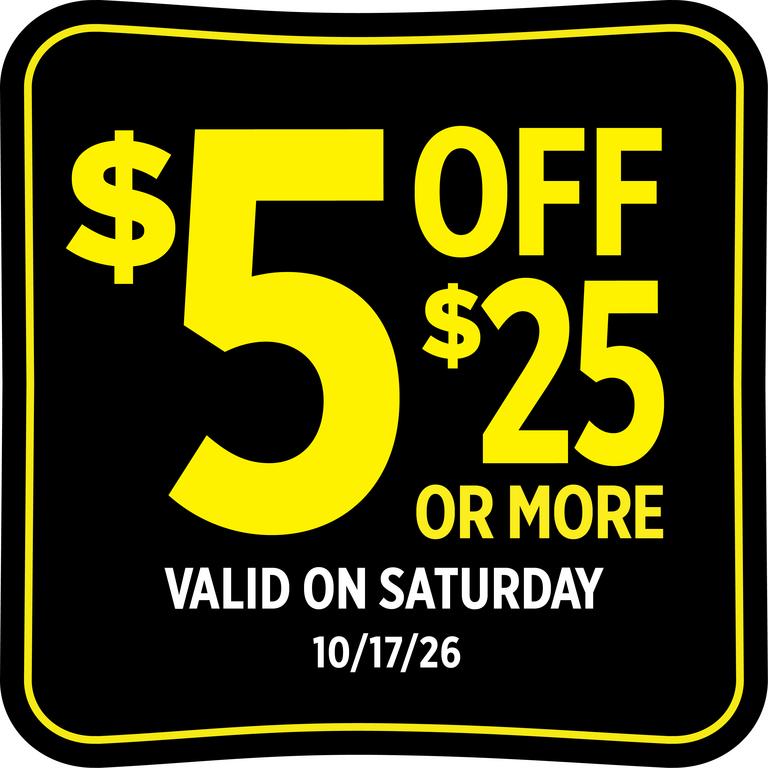
Image source: Dollar General
The system is designed to be intelligent. When you enter your phone number at the register, the store's computer scans your basket and automatically applies the highest value coupon available for each eligible item. This automation reduces the risk of human error, though it requires the shopper to be diligent about selecting the correct product sizes and scents specified in the coupon terms.
How to Set Up Your Account and Start Clipping Deals
Getting started is straightforward, but there are specific technical requirements you must meet to ensure a smooth experience, especially if you plan to use the mobile application.
Why You Should Register Your Phone Number Immediately
Your phone number is the most important piece of data in your myDG account. It serves as your "key" to the savings. During registration, you will be asked to provide a valid email address and a mobile phone number. This number is what you will type into the credit card terminal at the store to trigger your clipped coupons.
One of the primary benefits of this system is that it allows for app-free checkout . While the app is useful for planning, you do not actually need to have your phone out or even have the app installed to redeem your savings at the register, provided you have clipped the coupons on the website beforehand.
Technical Requirements for the myDG App
For those who prefer the mobile experience, the myDG app offers enhanced features like a barcode scanner and real-time cart calculations. However, users should be aware of hardware limitations. As of late 2026, Apple users generally require iOS 16.6 or later to run the most recent version of the app (Source: App Store) . If you have an older device that cannot update to this operating system, you can still manage your coupons through the mobile browser version of the Dollar General website, which offers similar functionality without the high system requirements.
How to Stack Coupons for Maximum Savings
Stacking is the process of applying multiple discounts to a single item or a single transaction. This is where the most significant savings occur, but it requires a clear understanding of the two different types of coupons offered by Dollar General.
Understanding the Difference Between Store and Manufacturer Coupons
These are issued by Dollar General. Examples include the "$5 off $25" Saturday coupon or "$2 off DG Home products." They are often labeled with a "DG" logo in the corner.
These are funded by the brands themselves (like Tide, Scott, or Kellogg's). They are explicitly labeled as "Manufacturer Coupon" in the digital gallery.
The golden rule of stacking at Dollar General is the 1+1 Rule : You can typically combine one Store Coupon with one Manufacturer Coupon on a single item. However, you cannot use two manufacturer coupons on the same item. For example, if you have a $1.00 off DG Store coupon for paper towels and a $1.00 off Manufacturer coupon for the same brand, you can use both to save $2.00. If you have two different manufacturer coupons for the same item, the system will only apply the one with the higher value.
Does Cash Back Apply Before or After Digital Coupons?
Dollar General has introduced "DG Cash Back" rewards, which function differently than instant discounts. According to the myDG Rewards rules , if an item is eligible for both a digital coupon and a cash back offer, the digital coupon will be applied to the price first . The cash back is then calculated based on the remaining balance or the specific terms of the offer. This is a crucial distinction for shoppers trying to reach a specific spending threshold for other deals.
| Scenario | Item Price | Coupon Value | Cash Back | Final Net Cost |
|---|---|---|---|---|
| Digital Coupon Only | $10.00 | $2.00 | $0.00 | $8.00 |
| Cash Back Only | $10.00 | $0.00 | $2.00 | $8.00* |
| Stacked (Coupon + Cash) | $10.00 | $2.00 | $2.00 | $6.00* |
*Net cost after cash back is credited to your account for future use.
How to Master the Saturday Five Off Twenty-Five Strategy
The "$5 off $25" Saturday coupon is widely considered one of the most effective ways to save. It is a store coupon that appears in nearly every account at the beginning of the week, valid only for the following Saturday. Here is the workflow used by power-shoppers to maximize this deal:
How to Use Digital Coupons Without the Mobile App
Many users prefer not to use a smartphone while shopping or may have limited data plans. Dollar General is one of the few major retailers that makes app-free couponing relatively simple. You can manage your entire account from a desktop computer or a tablet at home.
-
Log in to your account at
dollargeneral.com/deals/coupons. - Browse the categories and click the "Add" button on every coupon you think you might use.
- When you arrive at the store, shop as usual.
- At the checkout, look for the credit card terminal (the PIN pad).
- Before you pay, tap the yellow "Digital Coupons" button on the screen.
- Enter your registered 10-digit phone number.
- Watch the screen as the discounts are deducted from your total.
Using the In-App Cart Calculator to Avoid Surprises at the Register
One of the most significant advancements in the myDG app is the Cart Calculator . This tool is designed to address the common frustration of coupons not applying as expected. By using the built-in barcode scanner, you can check every item in the aisle before you put it in your physical cart.
When you scan an item, the app will explicitly state if a digital coupon is available and, more importantly, if it is currently clipped to your account. It also verifies if the specific size, scent, or variety of the product matches the coupon's requirements. For example, a coupon might be valid for "12-count packs or larger," and the scanner will alert you if you have accidentally picked up an 8-count pack. This tool ranks among the top features for ensuring your "Saturday Strategy" math is accurate before you reach the front of the line.

Image source: Google Play
What to Do When Your Digital Coupons Do Not Work
Technical glitches can occur, but most issues with a dollar general digital coupon can be resolved with a few standard troubleshooting steps.
How to Fix the Phone Number Already in Use Error
This is a frequent pain point for new users, often occurring when a shopper is assigned a recycled mobile phone number that was previously linked to another DG account. Because the system only allows one account per phone number, you will be blocked from registering. To fix this, you must contact Dollar General customer support. They can "un-link" the previous owner's information, allowing you to claim the number for your own myDG account.
Why Your Coupon Didn't Deduct at Checkout
If you entered your number and the total didn't drop, check this list of common culprits:
- The item was the wrong size or variety (e.g., 12oz vs 15oz).
- The phone number was entered after the cashier hit the "Total" button (it must be entered during the scanning phase).
- The coupon was not actually "clipped" to the wallet (it was only viewed in the gallery).
- The store's internet connection was temporarily down, preventing the register from reaching the digital coupon server.
- You reached a limit on that specific coupon (some offers are one-time use only).
How Your DG Account Connects to Ibotta and Other Rewards
For shoppers looking to "triple-dip" on savings, the connection between myDG and third-party apps like Ibotta is a significant step forward. When you sign into your DG account, you may have the option to link it to external reward platforms. This allows your purchase history to be shared automatically, verifying your eligibility for additional cash back without the need to scan paper receipts (Source: DG Privacy Policy) .
However, users should be aware of the privacy implications. By linking these accounts, you are consenting to share your shopping data with third parties for reward verification. If you are privacy-conscious, you may prefer to keep the accounts separate and manually scan your receipts into Ibotta after your shopping trip.
Current High-Value Coupon Matchups for October 2026
As of October 2026, several high-value matchups are available that demonstrate the power of the digital system. These deals are subject to regional availability but represent the typical savings potential found in the app (Source: Weekly Ad) :
- Laundry Care: Tide and Downy products are frequently featured in "2 for $7" deals. When combined with a $2.00 digital manufacturer coupon, the price per bottle drops significantly below big-box retailer averages.
- Paper Products: Scott Paper offers are currently providing $2.00 off two 6-count or larger packs. Stacking this with a Saturday $5 off $25 coupon makes paper goods exceptionally affordable.
- Household Cleaning: Brands like Palmolive and Snuggle are currently offering $2.00 cash back rewards, which can be combined with instant store discounts for a net savings of up to 73% on bundle purchases.
Frequently Asked Questions
Key Takeaways for Maximum Savings
Mastering the Dollar General digital coupon system is a highly effective way to manage a household budget. By following these core principles, you can ensure you are getting a top-tier deal every time you shop:
- Register your phone number immediately to enable app-free checkout at the register keypad.
- Clip coupons early in the week to ensure you don't miss out on offers with limited availability.
- Shop on Saturdays to take advantage of the $5 off $25 store coupon, which stacks with manufacturer deals.
- Use the Cart Calculator in the app to scan items and verify coupon eligibility before reaching the register.
- Stack strategically by combining one store coupon with one manufacturer coupon per item.
- Check your digital receipt in the app after every trip to ensure all discounts were applied correctly.
Start by logging into your account today and clipping the Saturday coupon to begin your journey toward significant retail savings.
All trademarks, copyrighted content, and quoted material referenced in this article belong to their respective owners. Brief excerpts are used under fair use (17 U.S.C. § 107) for purposes of commentary, criticism, and informational reporting. This article is not affiliated with or endorsed by Dollar General Corporation.