Home
How to Use Uber Courier to Send Packages and Return Items Locally
In recent years, the logistics landscape has shifted from traditional mail carriers to on-demand digital platforms. Uber Courier , primarily known as Uber Connect within the mobile application, has emerged as a top-tier choice for individuals and businesses needing to move items across town in minutes rather than days. Whether you are sending a forgotten set of keys to a roommate or returning a retail purchase to a shipping center, understanding the nuances of this service is essential for a smooth experience.
As of late 2026, Uber has expanded its delivery ecosystem to include specialized features like automated package returns and high-capacity business fulfillment. However, because the service relies on a peer-to-peer network of drivers, there are specific rules regarding weight, item safety, and insurance that differ significantly from traditional couriers like FedEx or UPS. This guide provides a detailed breakdown of how to navigate these services effectively.
What Is Uber Courier and How Does It Work?
Uber Courier is not a single service but rather a logistics layer that facilitates the movement of physical goods. According to official Uber documentation , the platform functions as a bridge between senders and a network of over 8.5 million active drivers and couriers. It is important to distinguish between the three primary pillars of Uber's delivery ecosystem to ensure you select the correct option for your needs.
Uber Connect
This is the consumer-facing version of the service. It is designed for peer-to-peer deliveries, such as sending a gift to a friend or delivering a document to a colleague. It is accessed directly through the standard Uber app under the "Package" icon.
Uber Direct
Uber Direct is a notably innovative B2B (Business-to-Business) solution. It allows merchants—ranging from local boutiques to giants like Apple and Walmart—to offer same-day delivery through their own websites. The delivery is fulfilled by Uber couriers, but the customer often interacts only with the merchant's interface.
The third and newest pillar is the Package Returns feature. This specific workflow allows users to hire a courier to take prepaid packages to drop-off locations like FedEx, UPS, or USPS. This service has seen significant growth as a convenience feature for remote workers and busy households. It is widely regarded as one of the most efficient ways to handle the "last mile" of the return process without leaving your home.
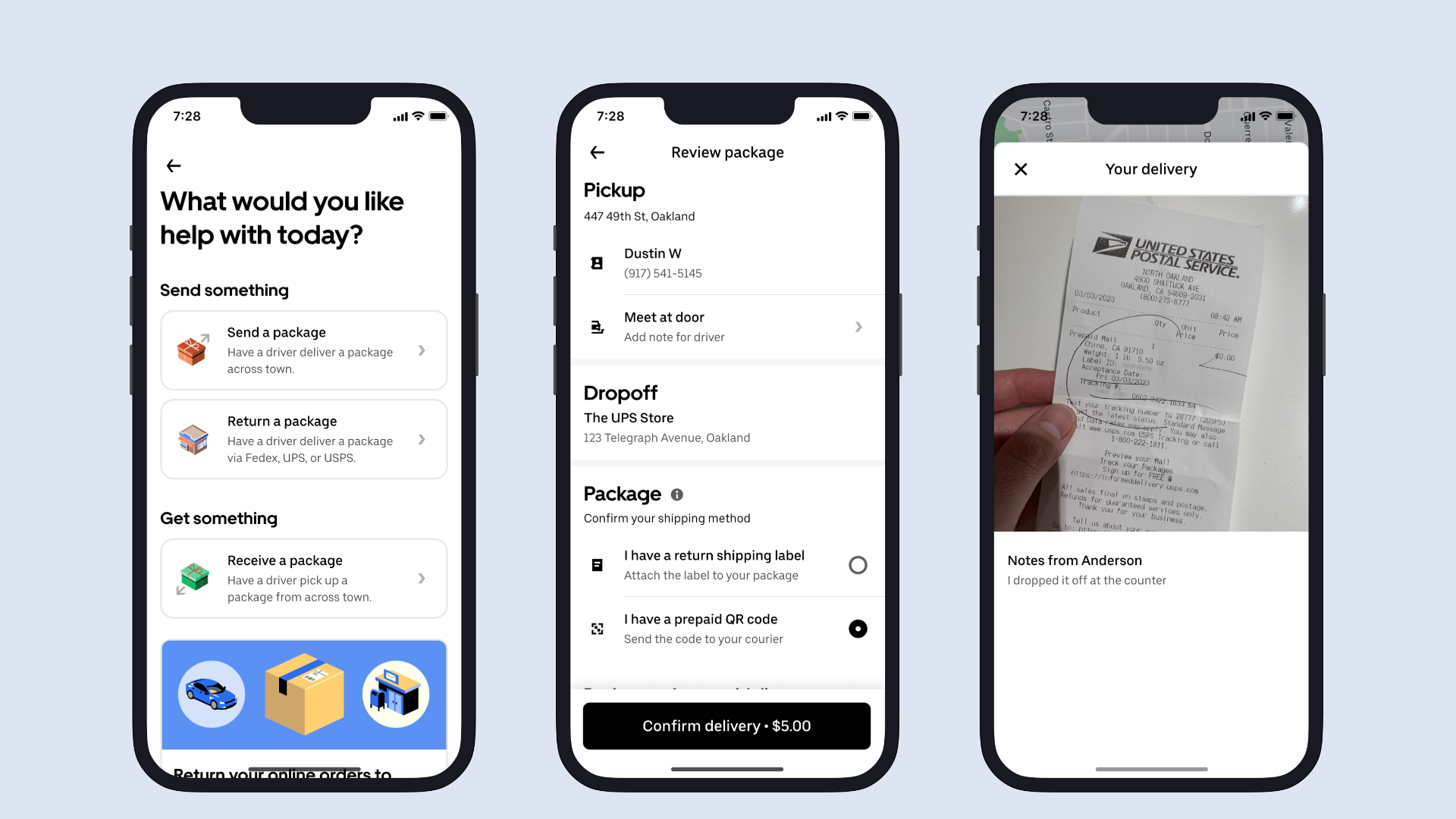
Image source: TechCrunch
How to Request a Delivery in the Uber App Today
Requesting a courier is a straightforward process, but it requires attention to detail to avoid "app friction" or delivery failures. The service operates on a "curb-to-curb" model, meaning drivers are generally not expected to enter buildings or navigate complex apartment hallways. Both the sender and the recipient should be prepared to meet the driver at the vehicle.
Open the Uber app and tap the "Package" button. You will be presented with two choices: "Send a package" or "Receive a package."
Input the exact pickup and drop-off addresses. The app will calculate the fare based on time and distance, similar to an UberX ride.
In many markets, you can choose between "Standard" and "Priority." Priority delivery ensures your package is the driver's only stop, reducing the transit time significantly.
Once a driver accepts, you can share a tracking link with the recipient. This allows them to see the driver's progress in real-time, which is a highly impactful feature for ensuring someone is ready at the curb.
According to Uber's rider help center , clear communication is the key to a successful handoff. Use the in-app messaging feature to provide specific details, such as "I am wearing a red hat" or "The package is a small blue box." This reduces the time the driver spends idling and ensures the 5-minute wait window does not expire.
Understanding the Weight and Size Limits for Your Package
One of the most common points of confusion for users is the discrepancy in weight limits reported across different Uber pages. This conflict usually stems from the difference between the consumer "Connect" service and the merchant "Direct" service. To avoid having a driver refuse your request, you must adhere to the limits specific to your service tier.
| Service Type | Max Weight | Max Dimensions | Best For |
|---|---|---|---|
| Uber Connect (Standard) | 5 kg (11 lbs) | 10 x 10 x 10 inches | Keys, documents, small gifts |
| Uber Connect (Large/Car) | Up to 15 kg (33 lbs) | Fits in a standard trunk | Grocery bags, small boxes |
| Uber Direct (Business) | 50 lbs | Suitcase-sized items | Retail orders, electronics |
| Package Returns | 5 packages total | Must fit in a vehicle | Prepaid retail returns |
The 5kg limit for standard Connect requests exists because many couriers in urban areas operate on bikes or scooters. If you attempt to send a heavy item via a bike courier, the order will likely be canceled. For larger items, the app typically matches you with a car-based driver, but it is always safer to assume the lower weight limit unless the app explicitly offers a "Large Package" option.
How to Use Uber to Return Packages to FedEx or UPS
The package return feature is a significant step forward for the platform, addressing a major pain point for e-commerce shoppers. For a flat fee—typically $5, or $3 for Uber One members—a courier will pick up up to five prepaid packages and drop them off at a local shipping hub. This service supports FedEx, UPS, USPS, and even Staples drop-off points.
Requirements for a Successful Return
Before you hit request, ensure your packages meet these criteria:
- All items must be securely sealed in a box or mailer.
- A prepaid shipping label must be firmly attached to each package.
- Alternatively, you must have a digital QR code ready to show the driver (though printed labels are preferred).
- The total value of the items should not exceed $100, given the insurance limitations.
Once the driver drops off the items, they are required to take a photo of the drop-off receipt and upload it to the app. This serves as your proof of delivery. According to Uber's newsroom , this feature is currently available in over 4,950 cities across the United States, making it a widely accessible tool for modern consumers.
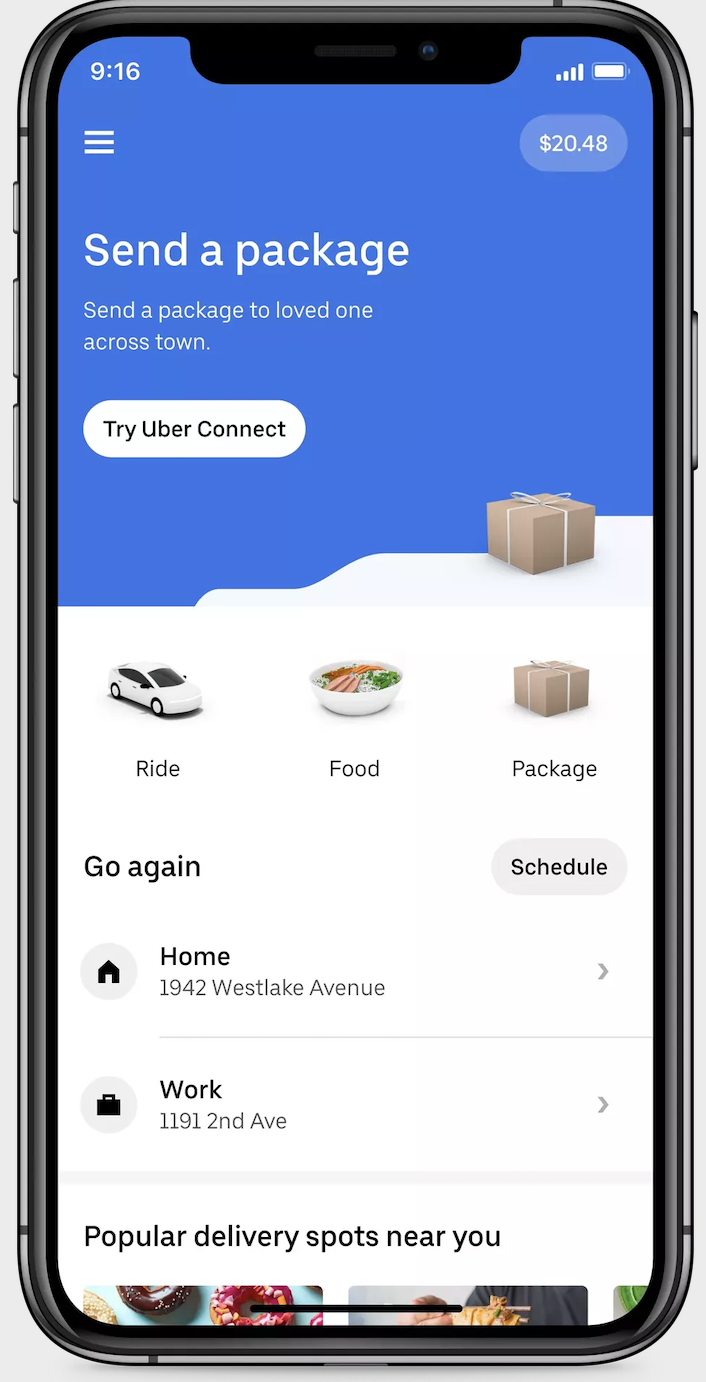
Image source: Uber
Is Your Item Safe? The Reality of Uber Courier Insurance
This is perhaps the most critical section for any user considering Uber Courier. There is a significant "insurance gap" that many users overlook. While Uber maintains liability insurance for the driver and the vehicle during the trip, the physical contents of your package are not insured by Uber against loss, theft, or damage.
If a driver is involved in an accident, the vehicle damage is covered. However, if your $500 smartphone is shattered in the process, Uber's standard terms of service explicitly state they do not provide cargo insurance. This makes Uber Courier a top-tier choice for low-value convenience items but a risky option for high-value assets.
Use Uber Courier if:
- The item is worth less than $100.
- The item is non-fragile (e.g., clothing, documents).
- The recipient is confirmed to be at the curb for immediate pickup.
Use a Bonded Professional Courier if:
- The item is high-value jewelry or electronics.
- The item is a legal original that cannot be replaced.
- The delivery requires "white-glove" handling or temperature control.
Furthermore, certain items are strictly prohibited. You cannot send alcohol, medication, firearms, or hazardous materials. Attempting to send these items can result in immediate account suspension and potential legal consequences. For regulated goods, specialized delivery services that include age verification and bonded handling are the only appropriate choice.
Expert Tips for Drivers Handling Uber Courier Requests
From the driver's perspective, Courier requests can be a highly impactful "gap-filler" between passenger rides. Veteran drivers on community forums like UberPeople.net often share "hacks" to maximize efficiency and protect their ratings. One common piece of advice is to use a small plastic crate or a thermal bag in the front seat to stabilize packages and prevent them from sliding during turns.
Another expert tip involves the "Ninja" delivery. While Uber Connect is technically curb-to-curb, many senders request that the driver "leave it at the door." To protect yourself from "item not received" claims, drivers should always take a photo of the package at the door and send it to the user via the in-app chat before completing the delivery. This creates a time-stamped, GPS-tagged record of the successful drop-off.
Drivers should also be aware of the 5-minute rule . If you arrive at the pickup or drop-off location and the person is not there, you are only required to wait five minutes. After this, you can initiate a "Return to Sender" through the app, which ensures you are paid for the return trip. This prevents couriers from losing money on idle time while waiting for unresponsive users.
Troubleshooting Common Uber Courier Problems
Even with a top-rated service, "app friction" can occur. One of the most common issues is the "Something went wrong" payment error. This often happens when Uber places a temporary authorization hold on your card that exceeds your daily limit or triggers a fraud alert. If this occurs, try re-linking your payment method or using a different card to resolve the hold.
Another frequent problem is the "Missing Recipient" scenario. If a driver arrives and the recipient is nowhere to be found, the driver is instructed to wait 5 minutes and then return the item to the sender. The sender is then charged for the full round trip. To avoid this, always confirm the recipient is ready before you hit the "Request" button.
Finally, handling damage claims is notoriously difficult. Because Uber does not insure the contents, filing a claim for a broken item usually results in a generic denial based on the terms of service. The only real solution is preventative: use excessive bubble wrap and sturdy boxes. If an item is too fragile to survive a standard car ride without professional padding, it is likely not a good candidate for Uber Courier.
Comparing Uber Courier to Other Local Delivery Alternatives
Uber is a strong contender in the local delivery space, but it is not the only option. Depending on your specific needs for speed, security, and weight, other apps might offer a better fit.
| Feature | Uber Courier | DoorDash (Drive) | FedEx Same-Day |
|---|---|---|---|
| Average Price | $8 - $20 | $7 - $15 | $50+ |
| Delivery Speed | 30-60 mins | 45-90 mins | 2-4 hours |
| Insurance | None (Contents) | Limited | Up to $100 included |
| Weight Limit | 5kg - 50lbs | 25 lbs | Up to 150 lbs |
Uber generally wins on speed and price for small, local items. However, for business-critical documents or heavy equipment, a professional service like FedEx Same-Day provides the bonded security and higher weight limits that peer-to-peer apps lack. DoorDash's "Drive" service is a comparable alternative, though it is more heavily focused on merchant-to-consumer food and grocery deliveries rather than peer-to-peer item swapping.
Summary of Key Takeaways
- Choose the right tier: Use Uber Connect for small personal items (<11 lbs) and Uber Direct for larger business needs.
- Mind the insurance gap: Uber does NOT insure the value of your items; only use the service for low-value or non-fragile goods.
- Prepare for curb-to-curb: Drivers are not required to enter buildings; ensure someone is ready at the curb for both pickup and drop-off.
- Utilize package returns: For a flat $5 fee, you can have up to 5 prepaid packages dropped at FedEx or UPS.
- Communicate clearly: Use the in-app chat to provide specific descriptions of the pickup point and the item to avoid delays.
- Check weight limits: Standard bike couriers cannot handle more than 5kg; ensure your package fits the vehicle type assigned.
Before you request your next delivery, double-check that your package is securely taped and that you have shared the tracking link with your recipient for a seamless handoff.
Frequently Asked Questions