Home
How to Become a GetYourGuide Supplier and Scale Your Tour Business
Becoming a GetYourGuide supplier allows tour operators to access a global audience of over 40 million monthly travelers. The platform operates on a commission-only model (typically 20-30%), meaning there are no upfront registration or maintenance fees. To get started, you need a registered business, tax ID, and liability insurance. Integration with connectivity partners like Rezdy or FareHarbor is highly recommended to automate bookings and prevent overcapacity issues.
What Is the GetYourGuide Supplier Program?
The GetYourGuide supplier program is a digital marketplace designed to connect local tour operators, attraction owners, and activity providers with a global traveler base. As of 2026, the platform hosts more than 150,000 activities across 12,000+ cities worldwide. For many businesses, it serves as a primary revenue driver, offering visibility that independent websites often struggle to achieve on their own.
According to recent industry data , the platform reaches approximately 40 million monthly users. This scale is supported by a robust network of 30,000+ marketing touchpoints, including partnerships with major airlines, hotels, and travel influencers. Whether you are an independent guide offering niche walking tours or a large-scale museum, the platform provides the infrastructure to handle bookings, payments, and customer service in 37 different languages.
One of the core strengths of the program is its mobile-first approach. With a 4.8-star app rating and hundreds of thousands of reviews, GetYourGuide has established itself as a top-tier choice for travelers who book experiences on the go. For suppliers, this means your products are optimized for mobile conversion without requiring you to invest in your own expensive app development.
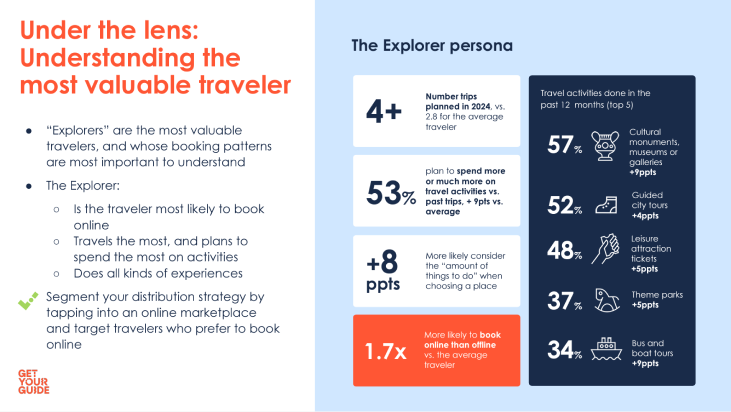
Image source: GetYourGuide Supplier
How to Register Your Business in 5 Simple Steps
The onboarding process is designed to be streamlined, though it requires careful attention to legal and financial documentation to ensure a smooth verification. Following these steps helps minimize delays in getting your tours live.
- Initial Account Creation: Visit the official GetYourGuide supplier portal to create your account. You will need to provide basic contact information, your company name, and the primary location of your operations.
- Legal and Financial Documentation: This is the most critical phase. You must upload your company registration documents, tax identification numbers, and proof of public liability insurance. You will also need to provide bank details (IBAN/SWIFT) to receive payments.
- Product Upload and Content Creation: Once your account is set up, you can begin listing your activities. The platform now features an AI-assisted content creator that helps draft descriptions based on your input, ensuring they meet the platform's specific style guidelines.
- The Verification Process: After submission, the GetYourGuide team reviews your application. This typically takes 1 to 2 weeks. They look for high-quality photos, clear meeting point instructions, and compliance with safety standards.
- Going Live: Once verified, you can set your availability and activate your listings. It is advisable to start with your most popular tour to build up reviews quickly.
What Does It Actually Cost to Sell on GetYourGuide?
The financial model of GetYourGuide is performance-based. There are no sign-up fees, no monthly subscription costs, and no charges for listing your products. Instead, the platform takes a commission on every successful booking made through their site or app.
Standard commission rates generally range between 20% and 30%. The exact percentage often depends on the volume of bookings you generate, the region in which you operate, and the type of activity you offer. While this may seem higher than direct booking costs, it covers the platform's massive marketing spend, credit card processing fees, and 24/7 customer support.
Payment cycles are another important consideration. By default, suppliers receive payments once a month for all completed tours. However, the platform offers a bi-monthly payment option for those who need more frequent cash flow. It is important to note that choosing bi-monthly payments usually incurs a small administrative surcharge, so many operators stick to the monthly schedule to maximize their margins.
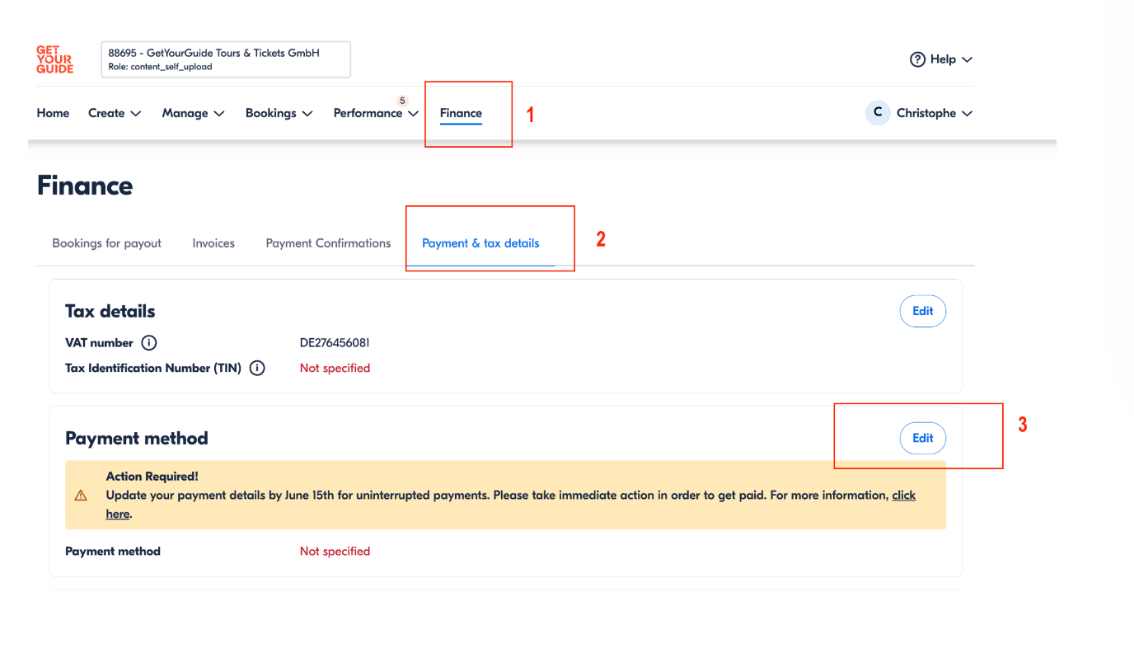
Image source: GetYourGuide
How to Optimize Your Listings for Maximum Bookings
Simply listing a tour is not enough to guarantee success; you must optimize for the platform's internal search engine. Industry experts, including those from Tourpreneur , suggest a specific formula for high-converting listings.
The Winning Title Formula
Your title is the first thing a traveler sees. A highly effective structure is: [Location] + [Experience Type] + [Duration] + [Unique Selling Point (USP)] . For example, instead of "Walking Tour of Rome," use "Rome: 3-Hour Sunset Walking Tour with Gelato Tasting." This tells the user exactly what, where, and why they should care in a single glance.
Photo Benchmarking for High Conversion
Visuals are the primary driver of clicks. Aim for 7 to 10 high-resolution, authentic photos. Data suggests that travelers prefer ground-level photos that show real people enjoying the experience. Avoid drone shots or overly polished stock photography, as these can sometimes feel disconnected from the actual tour experience. Ensure your first photo is a "hero shot" that encapsulates the entire activity.
Writing a Hook in the Short Description
The short description acts like a book cover. You have roughly 2 to 3 sentences to inspire the traveler. Use active verbs and focus on the emotional benefit of the tour. Instead of saying "We will visit the Eiffel Tower," try "Marvel at the Parisian skyline from the second floor of the Eiffel Tower as your guide shares hidden secrets of the Iron Lady."
GetYourGuide vs Viator — Which Platform Should You Prioritize?
Choosing where to list your inventory is a strategic decision. While many suppliers list on both, understanding their differences helps you allocate your marketing efforts more effectively. GetYourGuide is widely considered a top choice for the European market and mobile-savvy younger travelers, whereas Viator (owned by Tripadvisor) maintains an exceptionally strong presence in North America.
| Feature | GetYourGuide | Viator |
|---|---|---|
| Primary Market | Europe & Global Mobile | North America & UK |
| Commission | 20% - 30% | 20% - 30% |
| Monthly Users | ~40 Million | ~450 Million (via Tripadvisor) |
| Payment Terms | Monthly (Free) / Bi-monthly (Fee) | Weekly or Monthly |
| App Experience | Highly Optimized / Mobile-First | Strong, but Web-Integrated |
For most operators, the best strategy is a multi-channel approach. However, if your tours are based in major European hubs like Berlin, Paris, or Rome, GetYourGuide often provides a higher conversion rate due to its localized marketing and brand recognition in those regions.
How to Connect Your Existing Reservation System
Manually updating availability across multiple platforms is a recipe for overbookings. To scale effectively, you should use a connectivity partner. GetYourGuide supports over 250 reservation systems, including industry leaders like Rezdy, Bokun, FareHarbor, and Regiondo.
Connecting your system via API allows for real-time availability updates. When a traveler books on GetYourGuide, the spot is automatically removed from your own website and other OTAs (Online Travel Agencies). This not only saves hours of administrative work but also improves your ranking on the platform, as GetYourGuide prioritizes suppliers with "Instant Confirmation" and reliable availability.
To set this up, you will typically need to access the Integrator Login section of the supplier portal. From there, you can generate an API key or select your software provider from a dropdown menu to initiate the sync.
Real-World Challenges and How to Manage Them
While the platform offers immense growth potential, it is not without its friction points. Being aware of these challenges allows you to build a more resilient business model.
Handling Payment Delays
Community feedback from supplier forums indicates that payment delays can occasionally occur, particularly in regions with complex banking regulations like Japan or Peru. Some suppliers have reported waiting up to two weeks beyond their scheduled payment date. To mitigate this, always maintain a cash reserve and ensure your bank details are perfectly aligned with your registered business name.
Navigating the Verification Hurdle
It is not uncommon for new applications to be rejected initially. Sometimes this is due to "demand patterns," where the platform already has an abundance of similar tours in your area. If this happens, try to differentiate your offering. Instead of a generic "City Tour," focus on a specific niche like "Street Art Photography" or "Historical Ghost Walk" to prove unique value to the platform's curators.
Managing the "Book Now, Pay Later" Risk
GetYourGuide offers travelers a "Book Now, Pay Later" option. While this increases booking volume, it can lead to higher cancellation rates if the traveler's payment method fails at the 72-hour mark. Operators should monitor their "Likely to Sell Out" tags and consider tightening their own internal cancellation policies where the platform allows for flexibility.
Advanced Tools to Increase Your Revenue
Once your listings are live, you can use the platform's internal analytics to drive further growth. The supplier portal provides data-driven insights that many independent websites lack.
- Likely to Sell Out Insights: The platform uses predictive analytics to tell you which dates are expected to have high demand. You can use this to increase your capacity or adjust pricing for those specific windows.
- Special Offers: Running a temporary 10-20% discount can significantly boost your visibility in search results. The platform often highlights discounted tours with a special badge, which can lead to a reported 20% increase in click-through rates.
- Landmark-Based Search Logic: GetYourGuide categorizes tours by landmarks. If your tour passes by a major site like the Colosseum, ensure it is tagged correctly. This allows you to appear in both general city searches and specific landmark searches, doubling your exposure.
Key Takeaways for Success
- Verify your documentation thoroughly before starting to avoid 2-week delays.
- Use the optimization formula (Location + Experience + USP) for all tour titles.
- Prioritize authentic photography over drone or stock images to build trust.
- Sync a connectivity partner like Rezdy or FareHarbor to automate your inventory.
- Monitor "Likely to Sell Out" tags weekly to maximize your high-demand dates.
- Maintain a financial buffer to account for potential payment processing delays.
Start by listing your most popular activity today to begin building the review momentum necessary for long-term growth.
Frequently Asked Questions
How much commission does GetYourGuide take from suppliers?
The standard commission rate for GetYourGuide suppliers typically falls between 20% and 30% per booking. This rate is not fixed and can vary based on your business's location, the volume of bookings you process, and the specific category of your activity. There are no hidden fees for listing or account maintenance; you only pay when you successfully sell a ticket. This commission covers global marketing, payment processing, and customer support.
How do I reset my GetYourGuide supplier login?
If you are having trouble accessing your account, visit the Supplier Portal Login page and click on the "Forgot Password" link. You will be prompted to enter your registered email address. A password reset link will be sent to you shortly. If you do not receive the email, check your spam folder or contact supplier support, as your account may be temporarily locked for security reasons.
Is there a GetYourGuide supplier app for mobile?
Yes, GetYourGuide provides a dedicated supplier app available for both iOS and Android. This app is designed for operators who need to manage their business on the go. It allows you to scan traveler vouchers, check real-time booking manifests, and communicate directly with customers. Using the app to check in guests can significantly improve your operational efficiency and reduce wait times at the meeting point.
How long does the verification process take for new suppliers?
The verification process generally takes between 1 and 2 weeks. During this time, the GetYourGuide quality team reviews your legal documents, insurance coverage, and the quality of your product listings. To speed up this process, ensure that your photos are high-resolution and that your meeting point instructions are extremely clear. If the team finds any discrepancies, they will contact you via email for clarification.
Can I list the same tour on both Viator and GetYourGuide?
Yes, listing your tours on multiple platforms is highly recommended to maximize your reach. Most successful tour operators use both Viator and GetYourGuide to capture different segments of the market. To manage this effectively, you should use a channel manager or reservation software that syncs your availability in real-time across both platforms, preventing the risk of overbooking the same time slot.
What should I do if my payment from GetYourGuide is late?
If your payment has not arrived within the expected timeframe, first check the "Finance" section of your supplier portal to ensure your bank details are verified and up to date. If everything looks correct, contact the supplier support team through the help center. Keep in mind that international bank transfers can sometimes take 3-5 business days to clear after GetYourGuide has initiated the payment.